Tools for Sharing Your Repertoire with Wedding Clients
WhatsApp, Excel, Google Forms: every way to collect the couple's music preferences. Why a dedicated solution saves you hours of work.
March 20, 2026 · BandCalendar
The problem with collecting preferences
It's a scene you know well. The couple have just confirmed the booking. The time comes to find out what they want to hear during the evening. And that's when the back-and-forth begins.
WhatsApp message at 11pm: "Hi! So, for the ceremony we'd love Something by The Beatles, but also something classical. For the drinks reception we were thinking jazz, but nothing too heavy. Oh, and for the first dance we'd love Can't Help Falling in Love. Let us know if you can play them!"
You: "Perfect, sounds great. Can you send us a complete list so we can get it ready?"
Them: "But we don't know all the songs you do… Could you send us your repertoire so we can choose?"
You: (send a 12-page PDF with 300 songs)
Them: "Thanks! We'll have a look and let you know which ones we like."
Two weeks later: no update.
You chase. They reply with a 4-minute voice message in which the bride lists 23 songs from memory, the groom adds another 7, and the mother-in-law wants 5 that have nothing to do with the rest. You take notes on a piece of paper while sitting in the car. The next day you can't find the paper.
You send another message. They reply after 5 days with another partial list. In the meantime the first voice message has vanished somewhere in your chat history.
Result: 17 messages exchanged, 3 hours wasted, and you still don't have a clear picture of what they want. And the wedding is in three weeks.
Why traditional methods don't work
WhatsApp and voice messages
The problem with WhatsApp isn't the tool itself — it's that it's not designed to structure complex data. Messages get lost easily: after 10 exchanges, tracking down that voice note with 15 songs becomes an archaeological dig. Songs arrive scattered, with no classification, no breakdown by moment in the evening (ceremony, drinks, dinner, dancing). There's inevitable duplication of effort: whatever the client tells you has to be copied somewhere else (Excel, notes, a management system) because WhatsApp isn't an organised archive. Multiple versions multiply: "Actually, we don't want that song any more, can we change it?" — and you start again from scratch. There's no context at all: the client doesn't know which song fits which moment, and you have to explain it every time.
According to BrightLocal research, 57% of consumers prefer sending a text message to speaking on the phone. But when it comes to making complex decisions (like choosing 40–50 songs for a wedding), the freedom of WhatsApp becomes a limitation: without structure, preferences stay fragmented.
Shared Excel spreadsheets
Some more organised musicians try sharing a Google Sheets file with the couple. It's a step forward, but it has its own problems. First, it's too technical for the client: not everyone knows how to use Excel, especially on mobile. There's no visual guide at all: the client sees a list of songs but has no pointers on how to categorise them. The risk of errors is real: they delete a column, move formulas, edit things they shouldn't. The unprofessional appearance is another drawback: a spreadsheet doesn't communicate "I'm taking care of your wedding." And finally, no integration: what the client fills in stays in the sheet — you then have to copy it manually into your management system or setlist.
Google Forms
Google Forms are more structured, but have obvious limitations. The fragmented experience is the first issue: the client must fill in fields one by one, without an overview. There's no visual customisation: you can't assign colours to different moments of the evening. There's no legend: you can't explain to the client "use green for ceremony songs, blue for the drinks reception." To cap it all, the output is rigid: the responses arrive in a spreadsheet, but there's no automatic way to convert them into a setlist.
What you actually need: a dedicated solution
The underlying problem isn't the tool. It's that you're asking a client to do a complex classification task (choosing 40–60 songs and sorting them across 4–5 moments of the evening) without giving them the right tools.
A dedicated solution — a landing page generated by your management system — solves all the problems at once.
1. Professional presentation
When you send a link to a well-designed page, with your logo, your band's colours and a clear structure, the client immediately perceives professionalism. It's not a WhatsApp message dashed off between a soundcheck and a load-in. It's a document created specifically for them.
Why it matters: the couple are planning the most important day of their lives. Every supplier who conveys care and attention to detail earns trust. A polished page communicates "these people know what they're doing."
2. Guided structure
A well-built landing page divides songs into separate sections:
- Ceremony (bride's entrance, ring exchange, exit)
- Drinks reception (background music while guests mingle)
- Dinner (music during the meal)
- Dancing (the party itself)
Each section has a distinct colour and a label that you set before sending. The client doesn't have to guess: they know immediately which song goes in which moment.
3. Customisable legend
Before sending the link, you can configure a legend that explains to the client how to use the colours:
Green = ceremony songs Blue = drinks reception Yellow = dinner Pink = dancing
The client sees the legend at the top of the page and uses it as a reference while scrolling through the songs. They don't need to remember which colour they assigned to which moment.
4. Intuitive selection tools
Each song in the list has:
- Checkbox or highlight — the client clicks to select it
- Colour dropdown — assigns the colour corresponding to the moment of the evening
- Per-song notes field — they can add specific comments ("this one for the couple's entrance", "avoid if it's raining", etc.)
- General notes field — a free-text message to send you with any special requests
The client works independently, without needing to call you for every question.
5. Auto-save
The draft saves automatically every 30 seconds. The client can:
- Start selecting songs in the evening
- Stop and come back the next day
- Change their choices as many times as they like
- Submit only when they're happy
No risk of losing their work. No pressure to "decide everything right now."
6. Automatic receipt in your management system
When the client submits their selection, the data goes directly into your management system:
- Selected songs already categorised by colour/moment
- Notes associated with individual songs
- The general message saved against the event
No copy-pasting. No duplicate work.
7. One-click setlist generation
From the event detail, you see a button: "Create setlist from preferences".
You click and the system automatically generates a setlist with:
- The songs the client selected
- In the order of the evening's moments (ceremony → drinks → dinner → dancing)
- With the notes the client added
From there you can refine, rearrange, add transitions. But the heavy lifting is already done.
Head-to-head comparison: WhatsApp vs landing page
The time needed to collect preferences changes radically: with WhatsApp or Excel it takes 2–3 weeks of back-and-forth, while with a dedicated landing page the client works independently and finishes within 2–3 days. The number of messages changes dramatically too: from 15–25 exchanges to just 2 messages (sending the link and confirming receipt).
Categorising songs is another turning point: with traditional methods it's manual and error-prone, while with a landing page it's automatic by colour and moment. The risk of losing information — high with WhatsApp where messages and voice notes pile up — drops to zero when everything is saved in the management system.
The copy-paste duplication that's unavoidable with WhatsApp and Excel disappears entirely through automatic integration. The client's experience shifts from fragmented and confusing to clear, guided and professional. And how the couple perceive your professionalism transforms: from a tool that looks improvised to a dedicated system that communicates care and attention to detail.
Real cases: what musicians say
We spoke with some Italian wedding bands to understand how they handle this step.
Marco, guitarist in a wedding band from northern Italy (20+ weddings per year):
We used to use WhatsApp. The couple would send us voice notes, Spotify screenshots, YouTube links… a complete mess. I'd then have to sit there transcribing everything into Excel. Since we started using BandCalendar's online song selection, the couple fill it in themselves and we find everything ready to go. We've gained at least 3 hours per wedding.
Giulia, vocalist and band leader (Rome):
What I love most is that the couple no longer have the excuse of "we don't have time to choose." They can do it in the evening, from the sofa, at their own pace. And the result is much more precise: when they choose from a structured list, they think more carefully about what they actually want.
Luca, DJ and musician (Milan):
Before, it often happened that the couple would request songs the day before. Now with the selection locked in a week ahead, everything is settled in advance. And if they ask for last-minute changes, we can handle them because the foundation is already solid.
The complete workflow in BandCalendar
Here's how repertoire sharing actually works in BandCalendar:
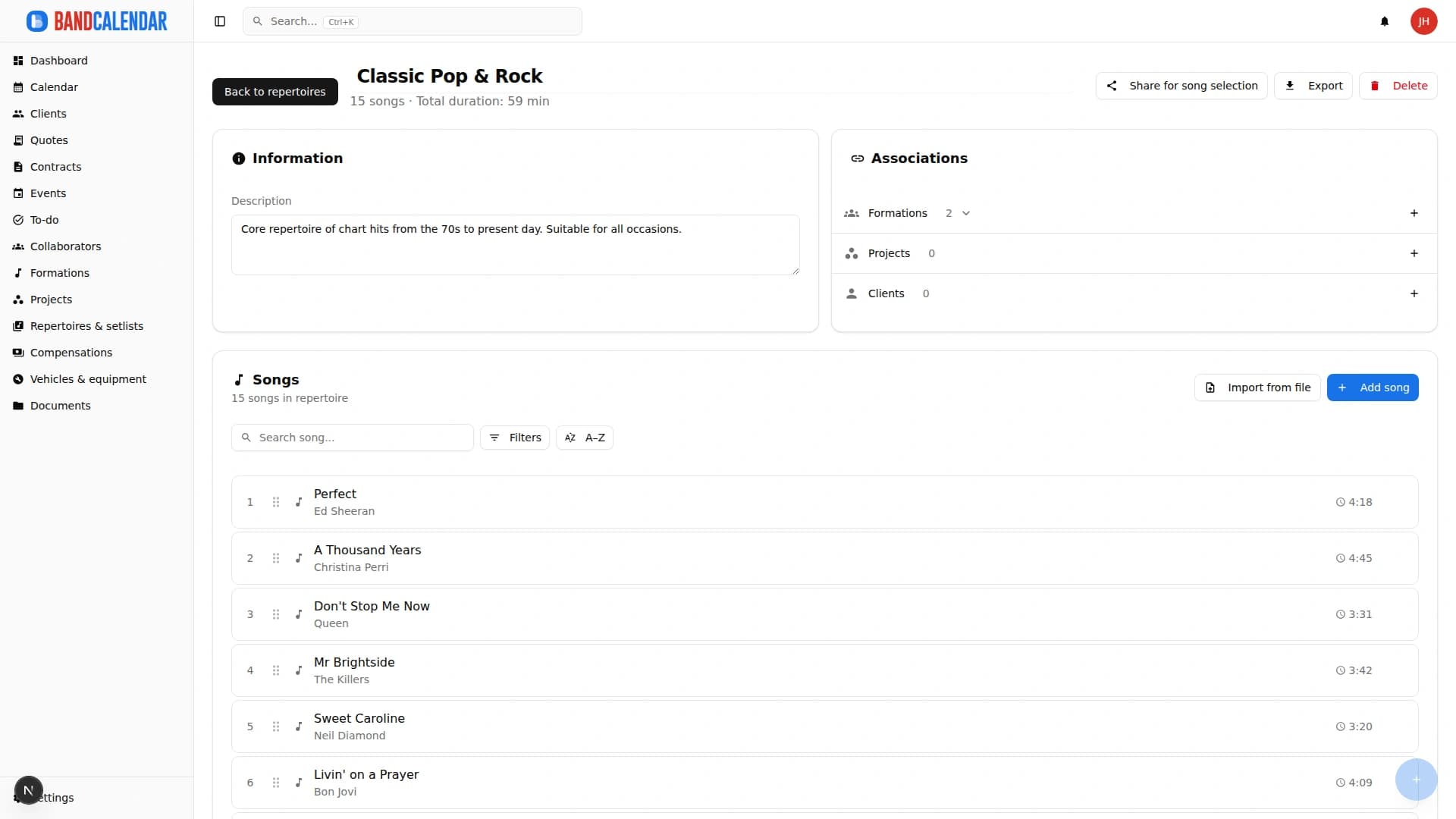
Step 1: Prepare the repertoire
From the Repertoires section, you create or select the repertoire you want to share. You can include all songs or just a selection (e.g. "Wedding repertoire 2026").
Step 2: Generate the link
You click "Share for song selection". A dialog opens where you:
- Give the link a name (e.g. "Smith Wedding — 15 June 2026")
- Set an expiry date (e.g. 30 days)
- Configure the colour legend (which moments of the evening and which colour for each)
- Choose whether to include all sections or just some
Step 3: Send the link
You click "Copy link" or "Send via WhatsApp" and send the link to the couple. The message can be pre-filled with text such as:
Hi James and Sarah! Here's the link to select the songs for your wedding: bandcalendar.it/s/abc123xyz. You have until 15 May 2027. You can change your choices as many times as you like. Enjoy listening!
Step 4: Monitor the status
From the repertoire detail you can see the status of each link:
- Not opened — the client hasn't clicked yet
- Draft — the client has started but hasn't submitted
- Submitted — the client has sent their selection
You can see how many songs have been selected and, if necessary, follow up with the client if the link has been in "Draft" for too many days.
Step 5: Review the selection
When the client submits, you can view their complete response:
- List of selected songs with colour/moment
- Notes on each song
- General message from the client
Step 6: Create the setlist
With one click on "Create setlist", the system generates a new setlist in the event with all the selected songs, already ordered by moment of the evening.
Step 7: Refine and confirm
Review the setlist, move a song if needed, add transitions or separators. Then share it with the band for rehearsals.
Unexpected side benefits
1. Less anxiety for the client
Couples often don't know how to go about choosing songs. Having a clear structure ("first think about the ceremony, then the drinks reception…") guides them and reduces decision anxiety.
2. More time for rehearsal
When you have a defined setlist 2–3 weeks in advance, you can organise rehearsals in a targeted way. No more "let's learn that song the night before because they asked for it yesterday."
3. Documentation for the future
After the wedding, you have a record of what worked for each couple. If you organise many similar weddings, you can use past selections as a starting point for new clients.
4. Perceived value
When a client sees such a well-crafted tool, they perceive that you're investing time and effort for them. This better justifies your price and reduces the pressure to negotiate down.
The bottom line
Collecting clients' music preferences isn't a minor detail. It's one of the steps that most affects your time and client satisfaction.
WhatsApp, Excel and Google Forms can work — but you pay a price in lost time, fragmented communication and the risk of errors. A dedicated solution like BandCalendar's transforms a chaotic process into a linear flow: the client works independently, you receive everything already structured, and you convert it into a setlist with one click.
It's not just a question of convenience. It's a question of perceived professionalism and time you can spend on music instead of administration.
Try BandCalendar's song selection
With BandCalendar you can generate personalised landing pages for song selection, complete with a colour legend, auto-save and one-click setlist generation.
Related BandCalendar workflows
Explore the connected features
Setlists and repertoires
Organize repertoires, song catalog, keys, notes, total duration, event setlists, song requests from the audience or client, exports and public shares in a workflow connected to events.
Open pageWedding bands
BandCalendar helps wedding bands and live musicians turn inquiries, quotes, contracts, repertoires, setlists, logistics and payments into one workflow that the whole team can use before, during and after the event.
Open pageDocuments and media
Organize PDFs, riders, contracts, quotes, images, audio, video, versions and public links in a cloud archive connected to clients, events, collaborators, lineups and projects, with contextual upload dialogs, PWA offline and controlled collaborator visibility on the event.
Open pageStop wasting time with Word, PDFs and spreadsheets.
- Contracts with simple electronic signature and tracked communications
- All confirmations in writing, no verbal-only agreements
- Protected reputation: everything in black and white
Get one useful guide a month