01
Client emails live in the personal mailbox of a single band member
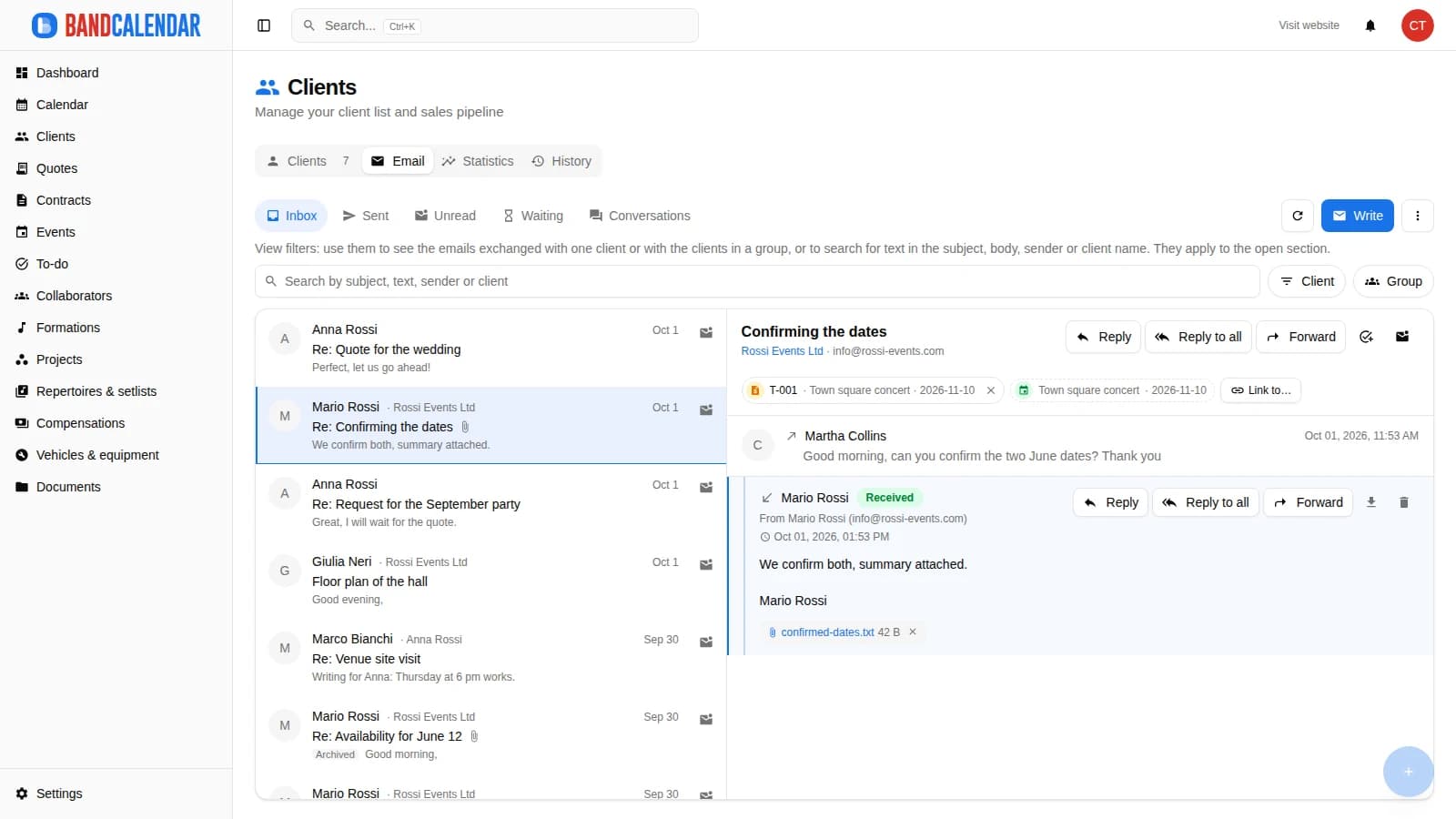
Write to clients from an event, a quote, a contract or the client page and find every email, with the replies, in the conversation of that client. The team mailbox has an inbox, unread messages and search; you can send to several clients at once, schedule a send and connect your own mailbox to write from your address.
In this page
Common friction
Client emails live in the personal mailbox of a single band member
To know what was said to a client you have to ask whoever wrote
Quotes sent and never followed up because nobody remembers to call back
Greetings, news and review requests sent one by one with copy and paste
Client replies that arrive outside the app and are not linked to an event or a quote
Definition
It is the place where the team writes to clients and reads their replies without leaving the app. In BandCalendar every email stays in the conversation of the client and can be linked to an event, a quote or a contract; the team mailbox shows inbox, sent, unread and conversations, and on the Pro and Business plans you can connect your own mailbox to send from your address.
Workflow
Open «Send email» from the client page, an event, a quote or a contract: choose a template, edit the text and attach documents. From a quote or a contract the PDF is already attached.
The email stays on the client page and in the team mailbox. On paid plans the replies are saved in the conversation too, with their attachments.
Link the conversation to an event, a quote or a contract, create a task from a thread and, from the Basic plan, set a reminder if the client does not answer.
From the Basic plan you send the same message to a contact group, to the filtered clients or to those picked by a rule: each receives their own email, without seeing the others.
On the Pro and Business plans you connect the team mailbox: emails leave from your address and what you exchange with clients is read from the mailbox and saved on their pages.
Connected features
Product screenshots
Try the workflow
Use the free plan to reproduce this workflow with your real clients, events, documents and collaborators.
Start by setting up
Internal links
Client directory with a Kanban sales pipeline, custom categories, additional contacts, statistics and import from CSV or Excel. Each client page gathers the events, quotes, contracts, documents and emails of that client, with email and WhatsApp actions in context.
Create professional quotes and contracts for music services from separate content and layout templates, with rich text editing, preview-consistent PDFs, services and expense reimbursements, online quote acceptance, public links and click-to-accept simple electronic signature without a client account.
The To-do area brings together Kanban tasks, rehearsals and reminders: priorities, due dates, assignees, checklists, comments and recurrences, linked to clients, events, projects and lineups. Rehearsals have place, times and participants; to pick the date there is the WhatsApp availability poll.
Invite members to the team and decide what they can see and do: default and custom roles with per-area permissions, visibility that can be limited to linked data and to the relevant lineups. The same account can belong to several teams and switch between them.
BandCalendar helps wedding bands and live musicians turn inquiries, quotes, contracts, repertoires, setlists, logistics and payments into one workflow that the whole team can use before, during and after the event.
BandCalendar helps entertainment agencies, live-entertainment companies and organizations coordinating many performers manage numerous lineups and projects, clients, events, documents and finances through a multi-user team with granular permissions.
FAQ
On paid plans (Basic, Pro, Business) yes: the reply is saved in the conversation of the client with its attachments and you read it in the team mailbox. On the Free plan replies go to the email of the team.
With the name of your team as sender. On the Pro and Business plans you can connect the team mailbox: emails leave from your address, through your mail provider.
Yes, from the Basic plan. Choose a contact group, the clients shown by the filters or a rule (for example those with a quote sent and not accepted). Each client receives their own email with their data and the link to stop receiving these messages.
Yes, from the Basic plan you choose the day and time, both for a single email and for a send to several clients. Until it leaves you can cancel it.
A message that leaves by itself some days after an event ends, with the text you write: it says thanks and, if you add the link, asks for a review. You switch it on from Settings → Messages, from the Basic plan.
If an address refuses an email, BandCalendar flags it on the client page and in the send window before you write again, and leaves it out of the sends to several clients.
Compare related workflows, then open the free plan when you are ready to test it on a real booking.