01
Contacts scattered across the phone book, chats, email and different spreadsheets
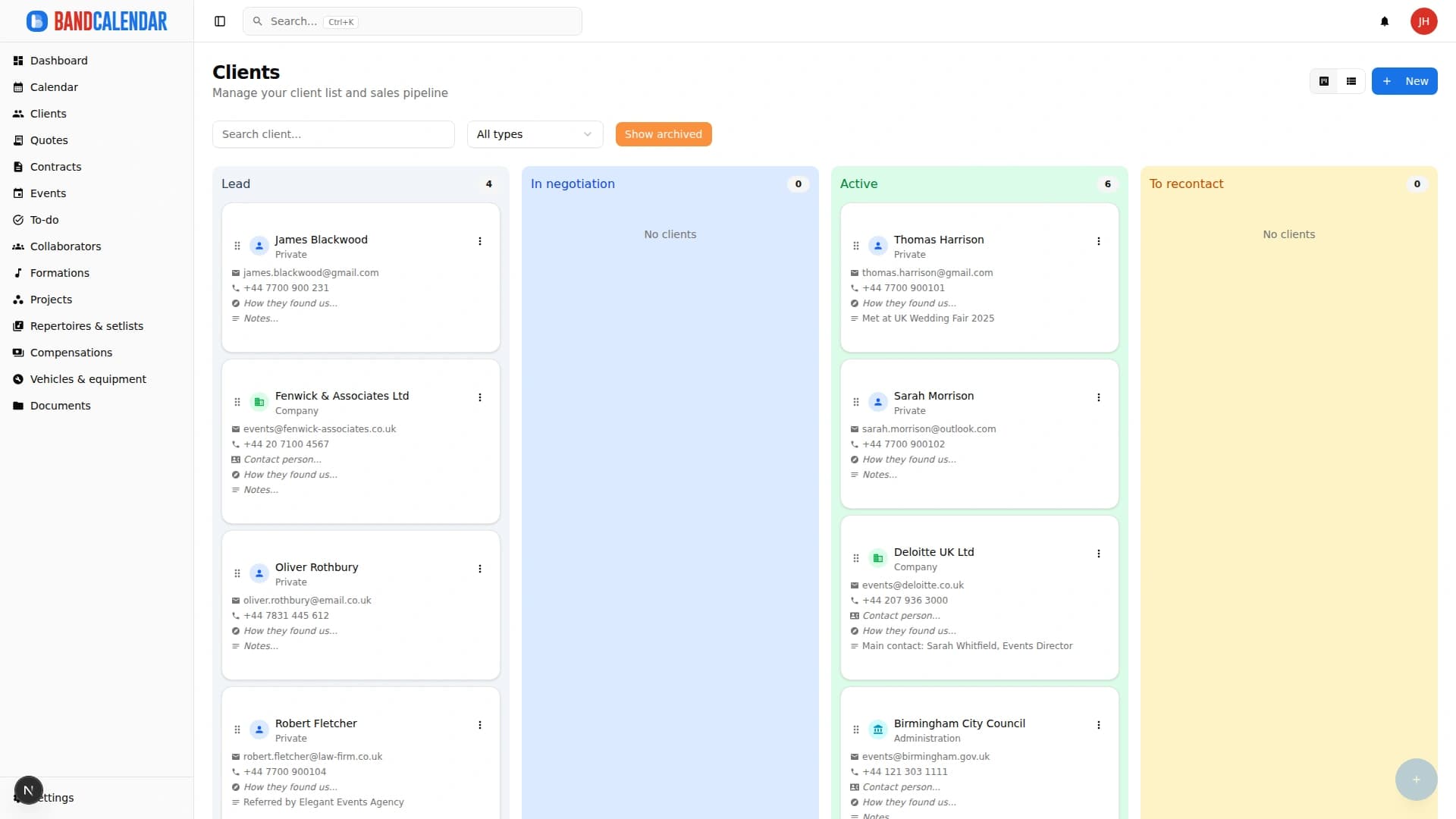
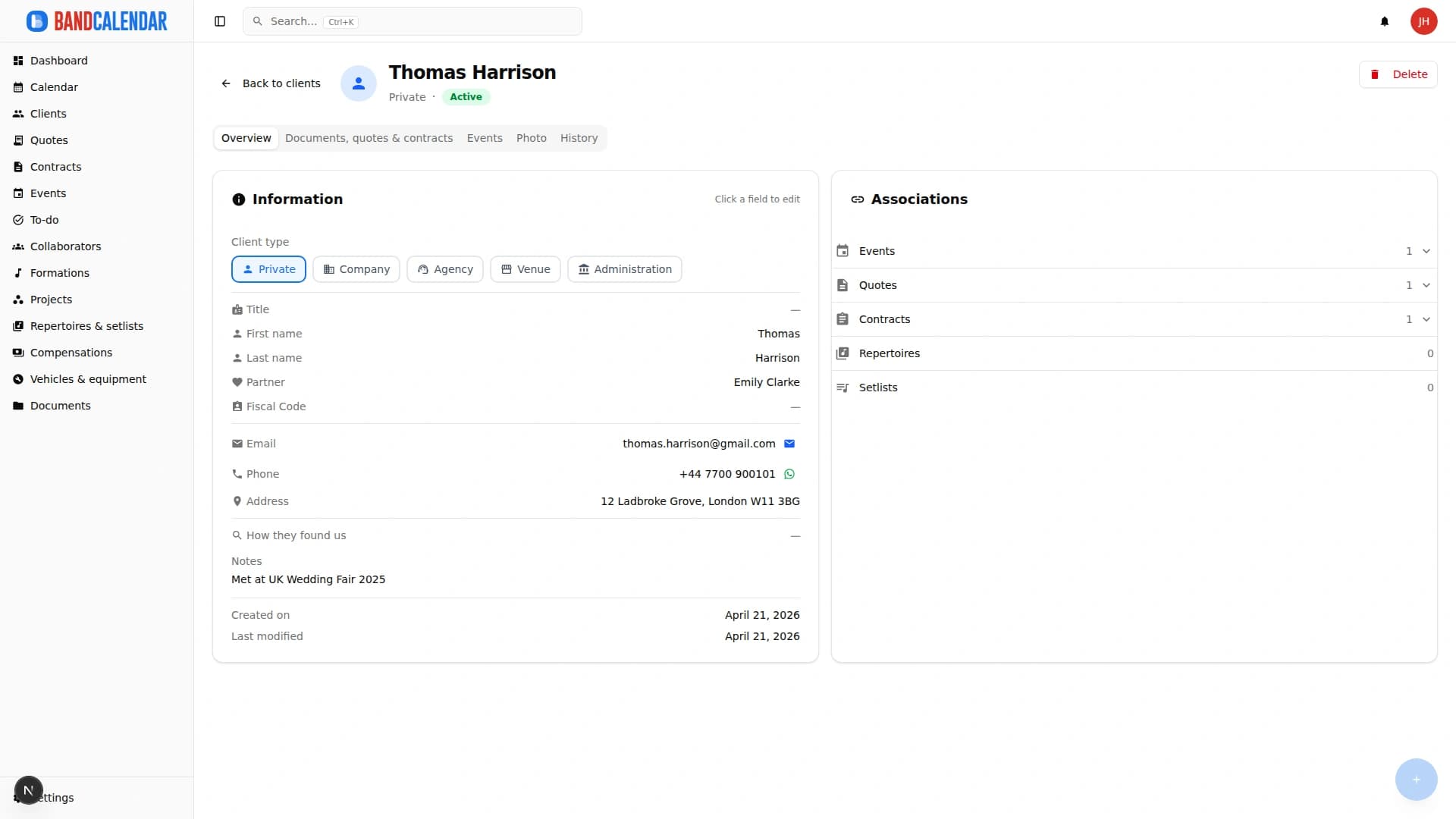
Client directory with a Kanban sales pipeline, custom categories, additional contacts, statistics and import from CSV or Excel. Each client page gathers the events, quotes, contracts, documents and emails of that client, with email and WhatsApp actions in context.
In this page
Common friction
Contacts scattered across the phone book, chats, email and different spreadsheets
Quote requests forgotten because nobody knows where the negotiation stands
Couples, wedding planners, agencies and venues mixed up with no way to find them
An existing client list in Excel that nobody wants to retype by hand
Rebuilding the history of a client means searching three different tools
Definition
A CRM for bands and musicians is the sales address book of people who play live: it keeps clients, leads and partners together and shows where each negotiation stands. In BandCalendar every client has a page with events, quotes, contracts, documents and emails, a Kanban pipeline for the sales stages and import from CSV or Excel to start from the contacts you already have.
Workflow
Create clients by hand or import a CSV or Excel file: map the columns, check the preview with possible duplicates and confirm.
Set the type (private, company, agency, venue, public body), the category, tags, source and partner, so you find the groups you need at once.
Move cards between Lead, Negotiating, Active and Follow up with drag and drop, or work from the List view with search and filters.
From the client page you create a quote or an event already linked and write by email or WhatsApp with a message template.
Events, quotes, contracts, documents, emails and the change history stay on the page; statistics show how clients are distributed by type, category and source.
Connected features
Product screenshots
Try the workflow
Use the free plan to reproduce this workflow with your real clients, events, documents and collaborators.
Start by setting up
Internal links
Write to clients from an event, a quote, a contract or the client page and find every email, with the replies, in the conversation of that client. The team mailbox has an inbox, unread messages and search; you can send to several clients at once, schedule a send and connect your own mailbox to write from your address.
Create professional quotes and contracts for music services from separate content and layout templates, with rich text editing, preview-consistent PDFs, services and expense reimbursements, online quote acceptance, public links and click-to-accept simple electronic signature without a client account.
Every BandCalendar event is a full operational record: client, commercial overview, services and programme, lineups and notifications, documents, Finances, to-dos, setlists, logistics, food and accommodation, notes and history.
An operational calendar for musicians and bands that connects sales pipeline, clients, gigs, rehearsals, tasks, reminders, lineups, documents, Excel export and personal Google Calendar and Apple Calendar/iCloud sync.
BandCalendar helps wedding bands and live musicians turn inquiries, quotes, contracts, repertoires, setlists, logistics and payments into one workflow that the whole team can use before, during and after the event.
BandCalendar helps entertainment agencies, live-entertainment companies and organizations coordinating many performers manage numerous lineups and projects, clients, events, documents and finances through a multi-user team with granular permissions.
FAQ
Yes. Upload a CSV or XLSX file, map the columns to the fields (BandCalendar suggests the matches and you can correct them), check the preview with errors and possible duplicates, then confirm. Nothing is written before you confirm.
With the Kanban pipeline: each client is a card you move between Lead, Negotiating, Active and Follow up. Archived clients stay hidden until you ask to show them.
Yes. Each client has a type (private, company, agency, venue, public body) and you can add custom categories, tags and source to filter the list and read the statistics.
Yes. Besides the main contact you can add other contacts with name, role and email, to put in copy when you write.
On the client page: events, quotes, contracts, documents, emails exchanged, shares and the change history.
Yes. From the client page you open the email window or WhatsApp with a message template; emails stay in the conversation of the client.
Compare related workflows, then open the free plan when you are ready to test it on a real booking.