01
Things to do before a date remembered by word of mouth or in a scrolling chat
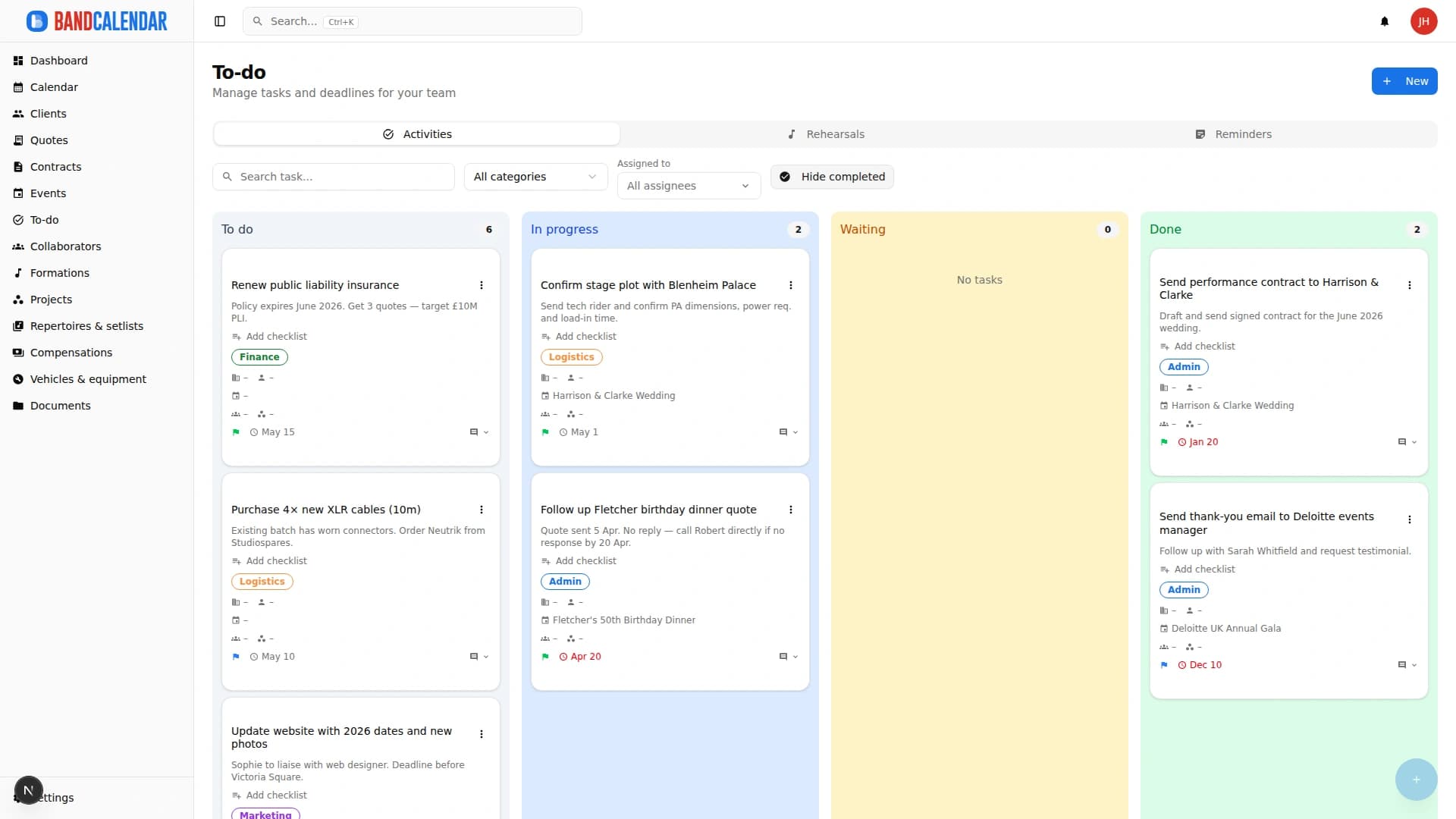
The To-do area brings together Kanban tasks, rehearsals and reminders: priorities, due dates, assignees, checklists, comments and recurrences, linked to clients, events, projects and lineups. Rehearsals have place, times and participants; to pick the date there is the WhatsApp availability poll.
In this page
Common friction
Things to do before a date remembered by word of mouth or in a scrolling chat
Nobody knows who has to send the rider, call the venue or chase the deposit
Rehearsals arranged in chat with ten messages to find a day that suits everyone
Recurring deadlines, such as a monthly invoice, left to memory
Personal reminders mixed with those of the whole group
Definition
With a shared list that says who does what and by when, tied to the dates. In BandCalendar the To-do area has three tabs: Tasks, in a Kanban with priority, due date, assignees, checklist and comments; Rehearsals, with place, times and participants; Reminders, personal or shared. Everything also appears in the calendar and triggers notifications.
Workflow
Title, priority, due date, category and assignee: a collaborator, a team member or both. Link it to a client, event, project or lineup.
Add a checklist of steps to tick off and use comments to discuss it in the team; the history keeps track of every change.
Set a daily, weekly or monthly recurrence with an end: the occurrences appear in the calendar.
Propose dates with the WhatsApp availability poll, then create the rehearsal with place, times, project or lineup and participants.
Personal or shared reminders and automatic alerts recall deadlines, rehearsals and events by email and push notification.
Connected features
Product screenshots
Try the workflow
Use the free plan to reproduce this workflow with your real clients, events, documents and collaborators.
Start by setting up
Internal links
An operational calendar for musicians and bands that connects sales pipeline, clients, gigs, rehearsals, tasks, reminders, lineups, documents, Excel export and personal Google Calendar and Apple Calendar/iCloud sync.
Every BandCalendar event is a full operational record: client, commercial overview, services and programme, lineups and notifications, documents, Finances, to-dos, setlists, logistics, food and accommodation, notes and history.
Manage the band's real lineup: core musicians, substitutes, extra collaborators, roles, instruments, lineups, projects, linked events, payments, documents and different team permissions.
Invite members to the team and decide what they can see and do: default and custom roles with per-area permissions, visibility that can be limited to linked data and to the relevant lineups. The same account can belong to several teams and switch between them.
Write to clients from an event, a quote, a contract or the client page and find every email, with the replies, in the conversation of that client. The team mailbox has an inbox, unread messages and search; you can send to several clients at once, schedule a send and connect your own mailbox to write from your address.
BandCalendar helps concert bands, tribute bands, entertainment agencies, promoters and live-entertainment companies manage gigs, tours, venues, changing lineups, setlists, technical documents, logistics, fees and reimbursements in one workspace.
FAQ
Yes. A task can have an assigned collaborator, an assigned team member or both, with due date and priority.
Yes. Set a daily, weekly or monthly recurrence, with interval and end; you can change a single occurrence or the whole series.
With the availability poll: choose the candidate dates, customise the message and open or copy it into the WhatsApp group you already use. Replies stay on WhatsApp.
Yes. Tasks with a due date, rehearsals and reminders appear in the calendar together with events, each with its own colour.
It depends on permissions. With visibility limited to linked data, a member sees the tasks assigned to them or created by them.
Yes. From a conversation with a client you create a task already linked, for example to remember to call back.
Compare related workflows, then open the free plan when you are ready to test it on a real booking.